
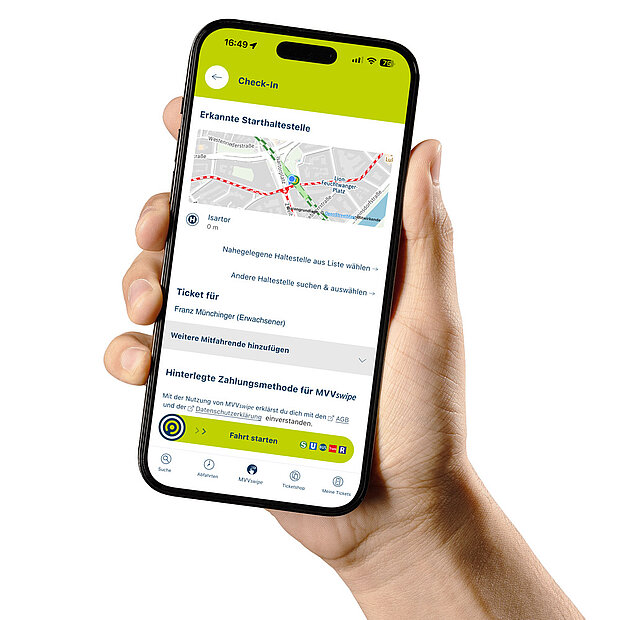
MVVswipe allows you to travel by bus and train without having to select a ticket beforehand.
Simply open the MVV app or a partner app, swipe across the screen and start your journey.
Swipe again at the end of your journey – the app automatically calculates the cheapest fare.
Benefits of MVVswipe:
- No need to select a ticket in advance – just swipe and set off.
- Automatic route detection and fare calculation (similar to a strip ticket).
- Never pay more than the price of a day ticket, no matter how often you travel.
- Easily add fellow passengers, e.g. family or friends.
- No paper ticket required – everything is digital via your smartphone.
- Ideal for spontaneous journeys, tourists or occasional travellers.
- Easy to use – popular with many users.
General information
MVVswipe is a smartphone-based ticketing system within the MVV app. Journeys on the MVV public transport network are started with a ‘swipe’, automatically recognised and charged. There is therefore no need to buy a ticket in advance.
How MVVswipe works:
- Before your journey: Swipe in the app to start CheckIn.
- After your journey: Once you’ve alighted, simply swipe to check out.
- Journey detection: The app automatically recognises your starting point and destination using location data (e.g. GPS). The distance travelled by public transport is calculated.
- Automatic fare calculation: The fare is calculated in the background. This takes into account your age, the fare zones travelled through, the time of travel and any travelling companions.
- Lowest daily fare: If you make several journeys in a day, the lowest daily fare under the MVV joint fare scheme automatically applies.
- End-of-day billing: The amount is debited at the end of the billing day via your registered payment method (e.g. Apple/Google Pay or credit card).
If you use MVVswipe, certain rules apply. These are set out in the General Terms and Conditions (GTC).
The MVVswipe service is provided by MVV (Munich Transport and Tariff Association). MVV acts on behalf of and for the account of the transport company Josef Ettenhuber GmbH.
The Terms and Conditions for MVVswipe supplement the standard rules for travelling by bus and train within the MVV area. These include:
- the General Conditions of Carriage,
- the fare regulations,
- and the fares under the MVV joint fare system
These rules always apply in their current version.
MVVswipe makes travelling by bus and train on the MVV network much easier:
- You no longer need to worry about which ticket you need – whether it’s a short-distance ticket, a single journey or a day ticket.
- You don’t need to know anything about fare zones – the app automatically recognises where you’re travelling.
- At the end of the day, the app calculates the cheapest price for all your journeys, including any passengers you’ve selected.
- You no longer need a paper ticket – your ticket is digital and right there in the app.
- You just need to swipe once to start your journey – and again when you get off.
This makes MVVswipe particularly handy for anyone travelling on the spur of the moment or who doesn’t want to worry about fares.
If you have any questions about travelling with MVVswipe, you can contact Customer Services:
- by email at kundendialog-swipe@mvv-muenchen.de,
- via the feedback form in the MVV app, or
- via the contact form on our website under the ‘MVVswipe’ category.
To ensure your enquiry is dealt with quickly, please describe the issue as precisely as possible. It is helpful to provide:
- your registered email address
- date and time of the journey(s)
- Number and type of passengers
If available, you may also attach a screenshot. This will help us to clarify the matter.
Fare
When you travel with MVVswipe, the app automatically calculates how much you need to pay – always the cheapest daily rate for you and your fellow passengers.
Here’s how it works:
- Before setting off, you select the number of passengers.
- You check in before you set off.
- You check out once you’ve arrived.
- The app records:
- how far you’ve travelled (fare zones),
- who travelled with you (adults, teenagers, children) and
- how many journeys you’ve made.
- It then uses this information to create the cheapest daily ticket combination for you and calculates the price.
- Best of all: MVVswipe automatically applies the rules for short-distance fares, strip tickets (adults and under-21s) and day tickets.
Examples:
- Person A (aged 56) travels from Marienplatz to Munich-Pasing.
→ Zone M
→ Price: €3.74 - Person B (aged 19) travels the same route.
→ Zone M with under-21 discount
→ Price: €2.04 - Person C (aged 30) travels with Person D (aged 19) and Child E (aged 9) from the main station to Munich Airport.
→ Zone M to Zone 5
→ Prices: Person C: €13.09; Person D (under 21): €7.14; Child E: €1.87
→ Total: €22.10
Making several journeys in a day?
If you travel several times a day, the app calculates at the end of the billing day whether a day ticket is worth it. You’ll then pay no more than the day ticket price – even if you’ve made lots of single journeys.
Examples:
- Person A travels from Marienplatz to Munich-Pasing and back in the morning and afternoon.
→ 2 × Zone M
→ 2 × €3.74 = €7.48 - Person B travels three times in Zone M
→ 3 × €3.74 = €11.22
→ The app recognises this and charges only €10.10 (Zone M day ticket)
With the day ticket, you can continue travelling until 6 am the following day – without paying extra. Please note, however, that you must check in for each individual journey; otherwise, you will not be authorised to travel.
Prices are subject to change; in case of doubt, please refer to the currently valid MVV joint fare schedule. You can find the current prices under ‘Tickets, Season Tickets and Prices’ on our website.
Yes, there is a maximum price:
- You’ll never pay more than the price of a day ticket for the zones you’ve used in a single day.
- If you make several journeys and the total cost would be more than a day ticket, you’ll automatically be charged the day ticket price.
Examples:
- Person A travels twice a day in Zone M.
→ Each journey costs €3.74, making a total of €7.48.
→ This is less than a day ticket, so Person A pays for two single journeys. - Person B travels to Zone M three times a day.
→ Each journey would cost €3.74, totalling €11.22.
→ This is more than the cost of a day ticket (€10.10), so Person B pays only the price of a day ticket and can continue travelling until 6.00 am the following morning – without paying extra. Please note, however, that you must check in for each single journey; otherwise, you will not be authorised to travel.
A journey carried out on a calendar day is defined as any journey that began and ended on a calendar day, as well as the last journey that began on a calendar day and ended on the following calendar day. Journeys that begin and end between 00:00 and 06:00 are counted as part of the previous day, provided that a maximum fare applies on that day (Note: The maximum journey time is five hours. An automatic check-out takes place after five hours at the latest. A journey that begins before 00:00 and ends after 06:00 is not permitted under the fare rules).
Prices are subject to change; in case of doubt, please refer to the currently valid MVV joint fare schedule. You can find the currently valid prices under ‘Tickets, Season Tickets and Prices’ on our website.
No discounts are offered as part of the MVVswipe scheme.
Register with MVVswipe
To use MVVswipe, you must first register. To do this, you’ll need an MVV-ID. The MVV-ID is your personal account for the MVV app.
Step-by-step guide:
1. Create an MVV ID (if you already have an MVV ID, you can skip this step)
- Open the MVV app.
- Go to the main menu (the icon with the three lines in the top left-hand corner).
- Select ‘Profile and login details’.
- Tap ‘Register’ under MVV-ID.
- Enter your email address, a password and other details.
- You’ll receive a confirmation email; click on the link in it.
- That’s it! Your MVV-ID is now active.
2. Log in to MVVswipe
- Open MVVswipe in the app (again via the main menu or via the quick access bar at the bottom).
- Click on ‘Go to the CheckIn page’.
- Enter your email address and password.
3. Complete the registration process
To use MVVswipe, you still need to do a few things:
- Accept the Terms and Conditions and Privacy Policy.
- Complete your personal details (e.g. address).
- Select a payment method:
- Apple Pay and Google Pay,
- credit card,
- PayPal,
- SEPA direct debit (via Verimi) or
Bonvoyo (beta version)
Depending on your bank, additional confirmation may be required.
Payments are processed via our payment service provider, Logpay.
- Grant permissions for journey tracking: GPS, Bluetooth and motion sensors.
Once everything is set up, you can start using MVVswipe straight away. Just swipe and off you go!
No, unfortunately that’s not possible. You need an MVV-ID to use MVVswipe.
With your MVV ID, you can use MVVswipe, MyRadl and OnDemand services, amongst other things. If you don’t have an MVV ID yet, you’ll need to register.
Journeys with MVVswipe
You must register before your first journey. You can create the MVV ID required for this in the MVV app under ‘Profile and login details’. You will then need to complete the registration by providing your personal details, a payment method and agreeing to the terms and conditions, privacy policy and location tracking features.
Before your MVVswipe journey:
- Open the MVV app.
- Check that the correct stop has been recognised (on the screen!). If necessary, you can select additional passengers for your journey.
- Swipe the MVV logo with one finger from left to right → this is your check-in. The app will recognise where you boarded.
- After checking in, you will receive your travel authorisation, which you must show if asked during a ticket inspection. If you only check in whilst the bus or train is moving, this may be considered an attempt at fraud.
After your MVVswipe journey:
- Swipe the MVV logo with one finger from right to left → this is your CheckOut. The app recognises where you got off.
- The fare is calculated automatically and debited from your payment method at the end of the billing day.
If you are unable to check in (e.g. due to a technical problem) or forget to check in, you will not have a valid ticket (‘travelling without a valid ticket’).
In this case, you’ll need to buy a standard ticket, e.g. via the MVV app (HandyTicket) or from a ticket machine.
- If you accidentally check in and then check out straight away, you won’t be charged for a ticket – as long as you stay at the same stop and the whole process only takes a few seconds. A journey costing 0 € may then appear on your statement.
- If you accidentally check out but actually want to continue your journey, you will no longer have a valid ticket! You must then check in again straight away or buy another ticket – e.g. a HandyTicket.
If you think your MVVswipe statement is incorrect, please contact us directly:
- by email at kundendialog-swipe@mvv-muenchen.de,
- via the feedback form in the MVV app, or
- via the contact form on our website under the ‘MVVswipe’ category.
We’ll look into your case and get back to you.
- If you need to change trains, you don’t need to check in and out again. You simply remain checked in.
- If you take a break (e.g. to go shopping) and continue your journey later, you should check out and then check in again shortly before continuing your journey.
Important:
- The maximum journey time is 5 hours. If you do not select a manual check-out within 5 hours, the system will automatically check you out.
Under the MVV Community Fare scheme, you are not permitted to use the same ticket for a return journey on the same route. In this case, MVVswipe will charge you for two single tickets.
For example, if you travel from Marienplatz to Pasing and back again, this counts as two journeys.
If you’ve been travelling with MVVswipe, you must check out again after your journey. This is important so that the app knows where you got off and how much you need to pay.
Here’s how the CheckOut works:
- After getting off the bus, train or underground, open the MVV app.
- Swipe the MVV logo with your finger from right to left – that’s your CheckOut.
- The app will confirm that the CheckOut was successful.
- The app records your location and calculates the fare for your journey.
- The amount will be automatically debited from your registered payment method (e.g. Apple/Google Pay or credit card) at the end of the billing day.
- If you realise you’ve forgotten to check out, you can simply do so later – as usual in the app.
- MVVswipe can automatically remind you if you forget to check out. To do this, you’ll need to allow the MVV app to send you notifications (in your smartphone’s settings).
If you think there’s an error with your MVVswipe bill, please contact us directly:
- by email at kundendialog-swipe@mvv-muenchen.de,
- via the feedback form in the MVV app, or
- via the contact form on our website under the ‘MVVswipe’ category.
We’ll look into your case and get back to you.
- In rare cases, the CheckOut may not work, even if you have a signal.
- This is usually because there is no GPS signal available – for example, in underground stations. It’s best to go outside, to the surface, and try checking out again there.
If CheckOut still doesn’t work, please contact us directly:
- by email at kundendialog-swipe@mvv-muenchen.de,
- via the feedback form in the MVV app, or
- via the contact form on our website under the ‘MVVswipe’ category.
We’ll look into your case and get back to you.
- MVVswipe detects when you’ve got off and are continuing on foot.
- If you’ve allowed the MVV app to send you notifications, you’ll receive a reminder after 5 minutes that you’ve forgotten to check out.
- To check out, you must confirm this in the app; otherwise, MVVswipe will continue to operate as normal.
MVVswipe also reminds you of the maximum journey duration. If you have been checked in for more than 5 hours, you will automatically be notified 30 minutes beforehand and then checked out.
If, despite the reminder, you think the charge is incorrect, please contact us directly:
- by email at kundendialog-swipe@mvv-muenchen.de,
- via the feedback form in the MVV app, or
- via the contact form on our website under the ‘MVVswipe’ category.
We will look into your case and get back to you.
With MVVswipe, you can use almost all forms of public transport within the MVV area. These include:
- Buses
- Trams
- Underground trains
- Commuter trains
- On-demand services (e.g. FLEX)
- Regional trains
Where does MVVswipe not work?
- On the MVV Bergbus.
- On long-distance trains such as the ICE, IC or EC – even if they run within the MVV area.
- On the Lufthansa Expressbus between Munich Central Station and Munich Airport.
MVVswipe detects when you leave the MVV network area. Your digital ticket is only valid within the MVV network area. As soon as you leave this area, you will be automatically checked out and your travel authorisation will expire.
You should therefore buy a ticket for the section outside the MVV network before your journey – for example, from Deutsche Bahn (DB) or the neighbouring transport network.
View
your ticket: Open the MVV app and select ‘MVVswipe’ → ‘Manage’. Your electronic ticket will be displayed there. Show this ticket to the ticket inspector.
Important:
- Check
in before your journey. You must complete check-in before boarding or before passing through the platform gates. Checking in after boarding counts as travelling without a valid ticket. - You are responsible
You are personally responsible for proving you have a valid ticket.
If you cannot show your ticket – e.g. due to a faulty display or technical problems – this counts as travelling without a valid ticket. - No screenshots
: Ticket inspectors can tell whether you are showing a genuine, active ticket or just a screenshot. Only the genuine ticket is valid.
- No, the app doesn’t need to be open all the time. You can use another app after checking in – the check-in will still remain active.
- However, the MVV app must be running in the background and the location setting ‘Always allow access to location data’ must be enabled.
Yes, you can take other people with you.
You can take up to 4 adults, 8 children or a combination of both. Two children count as one adult. Example: You can take 2 adults and 4 children with you.
Passengers must remain with the registered main user throughout the entire journey until they alight from the vehicle (bus, tram, regional train) or leave the specially marked transport facilities (S-Bahn, Underground).
The main driver must be at least 18 years old. Children and young people are not permitted to check in on their own, but may only travel as passengers.
No, that isn’t possible with MVVswipe.
Your ticket becomes valid as soon as you’ve checked in via the MVV app. So it’s best to plan your journey so that you check in in good time before setting off.
No, this isn’t currently possible with MVVswipe.
The MVV app offers other features, such as the ticket shop, where you can buy a Deutschlandticket.
Yes. From February 2026, MVVswipe can also be used in the MVV app and the MVGO app for journeys on the on-demand services FLEX and FLEXlinie (on-demand taxi).
Important information on usage:
- Bluetooth access is essential in order to use MVVswipe on the FLEX on-demand service.
- Bluetooth transmitters (beacons) are fitted in FLEX on-demand vehicles. These are necessary for tracking the journey, as FLEX does not have a fixed timetable or fixed stops.
- The Bluetooth signals are used exclusively for tracking the journey. No other data is exchanged and no further connection is established.
Payment / Invoicing
Here’s how to do it step by step:
- Open the MVV app.
- Select the ‘MVVswipe’ section and then ‘Manage’.
There you’ll find an overview of your journeys, the corresponding tickets and your daily fare. Any fellow passengers will also be displayed there.
- You can pay via PayPal, credit card, Apple Pay, Google Pay, Bonvoyo (beta version) or SEPA direct debit.
What do you need to bear in mind?
- Before your first journey, you’ll need to register and set up a payment method.
- To use SEPA direct debit, you’ll need to verify your identity once via the ‘Verimi’ process using your online banking. This is a security measure to prevent fraud. Please have your online banking login details to hand. You’ll be prompted to enter your details in a secure LogPay window. You won’t be able to use SEPA direct debit unless you’ve successfully verified your identity. In this case, please choose Apple/Google Pay, credit card or PayPal as an alternative.
Help & Contact
- If you have any questions about verification or encounter any problems, please contact:
LogPay Financial Services GmbH
Telephone: 06196 8012 702
Email: mobility@logpay.de
Here’s how to do it step by step:
- Open the MVV app.
- In the main menu (the icon with the three lines in the top left-hand corner), go to ‘Profile and login details’ (MVV ID).
- You can easily change your payment method there.
There may be various reasons why your payment method has been declined.
Please get in touch with Customer Services via the contact form and select the ‘MVVswipe’ category. Our team will be happy to help and will look into your enquiry.
MVVswipe tracks all your journeys in a day and finds the cheapest option for you – even if you’re travelling with others. This means that several single journeys may be combined into a day ticket or even a group day ticket. The final price of your journey(s) is therefore not confirmed until 6.00 am the following morning.
When will the payment be taken?
The amount will be debited from your payment method within three working days of settlement.
Don’t worry – the €10 is just a reservation and not a final charge.
When you check in for the first time that day, the MVVswipe system (via the payment service provider LogPay) reserves a flat rate of €10 on your payment method. This is a security measure.
The following morning, the system checks how much you’ve actually travelled:
- If you’ve travelled for less than €10, the remaining amount will be automatically refunded to you.
- If you’ve travelled for more than €10, the outstanding amount will be debited additionally.
The refund is processed automatically – depending on your payment method, this may take a few days.
The MVVswipe system tracks all your journeys in a single day – even if you’re travelling with others. As a result, several single journeys may be combined into a day ticket or even a group day ticket.
The price shown may differ from the total of the individual journeys – because the combination has resulted in you ‘qualifying’ for a cheaper ticket.
Example:
- You make three journeys in a day.
- The system recognises that a day ticket would be cheaper.
- You’ll be charged the day ticket price.
If you still think something is wrong, please contact us directly:
- by email at kundendialog-swipe@mvv-muenchen.de,
- via the feedback form in the MVV app, or
- via the contact form on our website under the ‘MVVswipe’ category.
We’ll look into your case and get back to you.
The final price of your journey(s) will be finalised at 06:00 the following morning, at which point you will automatically receive a receipt by email. This will include an overview of all the tickets you have used and their fares.
You can also view your journeys directly in the MVV app by opening the app, selecting the ‘MVVswipe’ section and then choosing the ‘Manage’ tab. There you’ll find all your past journeys and can view them again if required.
The final price of your journey(s) will not be confirmed until 6.00 am the following morning. Only then can you check with certainty whether everything has been charged correctly.
If you think you have been charged the wrong fare – e.g. due to a technical error or a fault – you can report this within 14 days of the journey.
How to make a complaint:
- by email to kundendialog-swipe@mvv-muenchen.de,
- via the feedback form in the MVV app, or
- via the contact form on our website under the ‘MVVswipe’ category.
Please describe the issue as precisely as possible (e.g. incorrect route, price too high, technical problems). This will enable customer service to help you more quickly.
Technical topics
The MVV app works on smartphones running the iOS/Apple and Android operating systems. You can find the app in the Apple App Store or the Google Play Store – simply search for ‘MVV app’.
If the MVV app isn’t working, there could be several reasons for this:
- Your smartphone may not meet the technical requirements.
- You may have been blocked from using the app.
- There is an update that you haven’t installed yet.
Here’s what to do, step by step:
- Restart the app.
- Restart your mobile phone.
- Reinstall the MVV app.
- Contact customer service via the contact form in the ‘MVVswipe’ category.
Important:
You must be able to display the barcode of your ticket on your mobile phone. Screenshots or other documents are not considered valid tickets. It is your responsibility to ensure that your mobile phone is working and that the barcode can be displayed. If you are unable to show a valid ticket (e.g. due to a flat battery or an app error), this will be treated as travelling without a ticket.
If MVVswipe is not available, please purchase your ticket via other channels, e.g. using the HandyTicket feature in the MVV app or at a ticket machine!
MVVswipe relies primarily on GPS to determine your location and to record and calculate your journeys. The use of Bluetooth and activity/fitness data provides additional, but necessary, improvements to location tracking:
- In underground locations, such as underground stations, the GPS signal is severely limited due to the depth. So-called Bluetooth beacons are therefore used to significantly improve location tracking. These are installed at stops and transmit a simple signal that MVVswipe can recognise as a stop. Beacons are also used in vehicles operating the FLEX on-demand transport service. These are necessary for location tracking, as FLEX does not have a timetable or a fixed sequence of stops. No data exchange or connections take place beyond the purpose mentioned above.
- MVVswipe requires access to activity/fitness data in order to distinguish between different modes of transport. For example, this allows journeys made on foot or by bicycle to be clearly distinguished from other modes of transport and (not) taken into account when calculating the fare.
Access to the aforementioned functions on your smartphone is mandatory for using MVVswipe. If you deactivate one or more of these functions or revoke the relevant permissions during a journey, the journey will be automatically ended (CheckOut) and you will no longer have a valid ticket.
Yes, you need a working internet connection to use MVVswipe.
- Check-in and check-out
- Updating your details
If you have already checked in, you can continue your journey even without an internet connection. Your ticket remains valid – even if you’re checked by a ticket inspector.
Important:
The system detects when aeroplane mode is activated. You will then be unable to check out. Furthermore, this action may be considered misuse of the service.
- A journey lasting around an hour uses approximately 500 KB.
→ Shorter journeys use less, whilst longer ones use slightly more. - Average power consumption is between 3 and 4 % per hour.
Consumption may increase if your screen is left on continuously or if you’re using other apps at the same time. You can save battery life by, for example, reducing the screen brightness.
The MVV app uses your smartphone’s location data (GPS), Bluetooth and motion sensors (fitness data) for MVVswipe – but only with your explicit consent.
When is the data collected?
- Data collection begins after you check in and ends when you check out.
What is the data used for?
- To identify your starting point, stops along the way, destination and mode of transport.
- So that your journey or trips can be correctly identified and billed accurately at the end of the billing day. Even if you cover part of the route on foot or by bike, or if you accidentally close the app.
If, during a journey, you disable the GPS function, Bluetooth or motion sensors (fitness data), or revoke the relevant permissions:
- The journey will be automatically ended (CheckOut).
- Your journey authorisation will expire and you will no longer have a valid ticket.
There are many stops in the MVV area that are very close to one another. To ensure that your journey is correctly recognised and charged via the MVV app, your smartphone must be able to determine your location very accurately.
You can enable this in your smartphone’s settings:
- Android: Settings → Location → Mode → ‘High Accuracy’
- iPhone: Settings → Privacy → Location Services → MVV app → enable ‘Always’ and ‘Precise Location’
- Changing your mobile network provider:
You don’t need to do anything else. The app will continue to work as normal. - Changing your mobile number:
You can enter your new number in the MVV app’s settings. - Changing your smartphone:
Download the MVV app onto your new phone from the App Store or Google Play. You can then log in to MVV-ID using your existing login details.
You can easily delete your MVVswipe account and your personal details yourself:
Here’s how to do it in the app:
- Open the MVV app.
- Go to the main menu (the icon with the three lines in the top left-hand corner).
- Select ‘Profile and login details’.
- Go to ‘Change login details’.
- In the ‘Delete account’ tab, enter your password and confirm the deletion.
Alternatively:
You can also send us an email requesting deletion to datenloeschung@mvv-muenchen.de.
Important:
- The deletion only applies to your user account.
- For legal reasons, billing details (including your name and address) must be retained for up to 10 years.
When you use MVVswipe, your personal data is processed and protected in accordance with the applicable privacy policy.
Where is the data stored?
- The data is stored in secure data centres in Germany.
How long is the data stored for?
- Personal data is only stored for as long as is necessary for use and billing purposes, or where statutory retention periods apply.
- For legal reasons, billing data must be stored for up to 10 years.
No, the MVV app does not create activity profiles for you.
- For automatic journey detection, location services/GPS, Bluetooth and activity/fitness data must remain enabled on your smartphone whilst you are travelling.
- This data is collected exclusively between CheckIn and CheckOut.
- MVVswipe also never accesses your health data.